How I Separated My Business Costs from My Household Groceries on One Dashboard
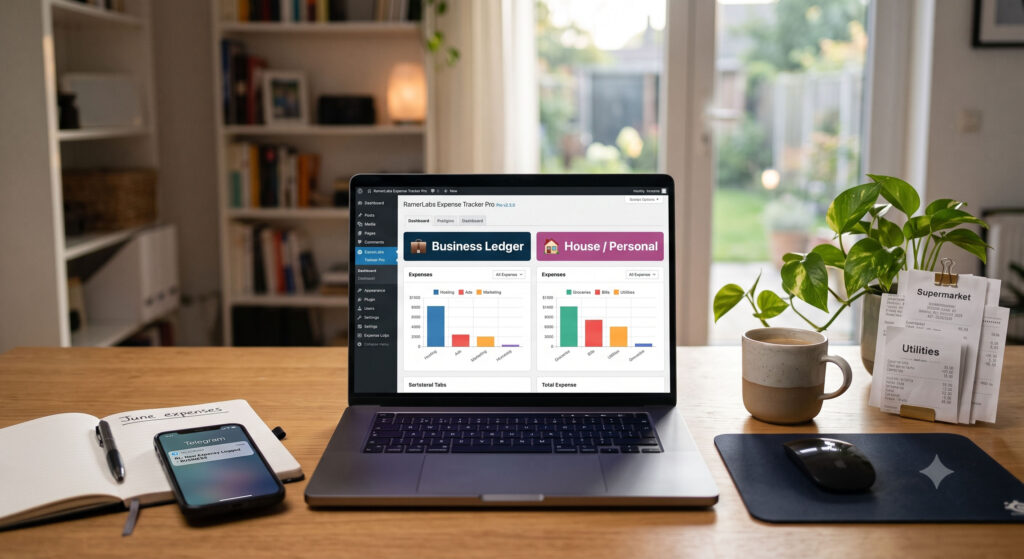
If you run your own business, work as a freelancer, or manage a remote agency, you know the classic financial nightmare all too well.
It starts innocently enough. You use your main credit card to renew an API license or top up your advertising account. A few hours later, you use that same card at the local supermarket for the family’s weekly grocery run. By the end of the month, your bank statement is a tangled web of SaaS platforms, utility bills, design assets, and organic produce.
For years, my accounting system consisted of “mental math” and a spreadsheet that I actively dreaded opening. When tax season rolled around, I would spend days manually highlighting line items, trying to remember if a specific charge was a tax-deductible cloud server deployment or just a late-night household delivery. The co-mingled data was more than a disorganized mess—it was a source of constant mental fatigue.
The Turning Point: Escaping the SaaS Tax
Like any modern entrepreneur, my first instinct was to look for a software solution. But as I shopped around, I hit a wall. Most premium financial tracking tools charge steep, recurring monthly fees. Worse yet, managing separate entities meant paying for multiple accounts or constantly logging in and out of different profiles.
That is when it hit me: why pay for an external, third-party cloud platform to store my highly sensitive financial data when my most utilized command center was already open on my screen all day?
The solution wasn’t another subscription. It was sitting natively inside my own WordPress site via RamerLabs Expense Tracker Pro.
The Setup: Creating Two Worlds under One Roof
Instead of wrestling with isolated spreadsheets, I leveraged the unlimited workspace engine inside the plugin. Setting up two entirely distinct financial entities took less than two minutes.
Here is exactly how I segmented my life:
- 💼 Business Ledger: A workspace strictly dedicated to corporate overhead. I populated it with categories like Hosting & Software, Marketing & Ads, and Design Assets.
- 🏠 House / Personal: A workspace entirely separate from my company. I built custom categories here for Groceries & Food, Utilities & Bills, and Home Maintenance.
By segregating these two scopes at the database level, I instantly ensured that my business metrics would never accidentally bleed into my personal cost sheets.
The “Magic” of the Workspace Switcher Tabs
The true game-changer of this system is the UX design of the top-bar workspace switcher tabs. Sitting proudly at the top of my WordPress admin screen, these tabs provide immediate mental relief.
[💼 Business Ledger] [🏠 House / Personal] [+ Add Workspace]
Clicking between them feels like magic. The moment you select a tab, the entire interface transforms instantly:
- The Entry System Flips: The category mapping dropdown immediately switches from business tags to home tags.
- The Value Matrix Re-calculates: The total balance summary cards instantly update to reflect only the selected context.
- The Multi-Axis Visual Analytics Adjust: The category allocation doughnut chart and the 6-month historical spend bar chart re-render seamlessly to map out exactly where that specific entity’s cash is flowing.
Why this matters: There are no page logouts, no sluggish loading times, and zero cross-contamination of data. If I am in business mode, I see business. If I am tracking household budgets, a single click changes my entire universe.
The Automation Bonus: Real-Time Peace of Mind
Beyond the convenience of the switcher tabs, two automated layers keep my tracking honest and effortless.
First, the plugin features active budget progress tracking. I set a monthly limit for both workspaces. As I log entries, the dynamic progress bar tracks my utilization rate and shifts color instantly—moving from a calm Green to a cautionary Orange, and finally to an urgent Red if I break my threshold. I know my exact burn rate before I overspend.
Second, the plugin is directly wired into my Telegram app via a secure bot integration. The exact second a transaction is committed to the database, an instant notification dispatches to my private Telegram channel:
💰 New Expense Logged [BUSINESS LEDGER]
Date: 2026-07-07
Category: Hosting & Software
Amount: ₱2,450.00
Notes: Laragon production cloud server deployment renewal.
Total Financial Clarity Is Just One Tab Away
Separating business capital from domestic expenses doesn’t require thousands of pesos in monthly software subscriptions or hours of manual spreadsheet sorting. By centralizing my financial workflows inside WordPress, I reclaimed my time and eliminated my tax-season anxiety. With a single click, I can generate separate, clean CSV data exports to hand off to my accountant, knowing every single peso is perfectly categorized.
If you are ready to stop drowning in co-mingled data receipts and want a streamlined, self-hosted command center built for your exact workflow, it is time to upgrade your system.
🛠️ Ready to Automate Your Financial Tracking?
Discover premium custom development, secure database structures, and seamless API integrations tailored directly to your team’s business requirements. Explore RamerLabs at ramerlabs.com.