RamerLabs Webmail Pro: Modern Branded Webmail for Your Domain (Live Demo)
Most hosting companies still hand customers a Roundcube skin that looks like 2012. It works. It is familiar. It also makes your brand feel like an afterthought the moment someone opens mail.
If you sell hosting, agency retainers, or domain packages, that first impression matters. People judge your whole stack by the inbox they open every morning. A dated webmail UI quietly trains them to expect average service.
RamerLabs Webmail Pro is built for teams that want @yourdomain.com mail with a modern product feel – not a generic panel skin. Deploy it on your domain, activate a lifetime license, connect cPanel mailboxes, and give users an inbox that matches the rest of your brand.
Try the live demo before you buy: https://webmailpro.ramerlabs.com/
What RamerLabs Webmail Pro is
Webmail Pro is a licensed Next.js webmail application. It connects to real IMAP and SMTP accounts on your cPanel (or compatible) mail host, provisions new mailboxes through the cPanel UAPI, and wraps everything in a clean three-pane interface plus productivity tools.
It is for:
- Hosting providers who want branded webmail instead of Roundcube defaults
- Agencies deploying client domains with a polished mail experience
- Businesses that already own a domain and want @company.com mail with modern UX
- Developers who prefer a Vercel-ready Next.js codebase over PHP skins
You are not renting a shared mailbox UI. You deploy the product, activate your RamerLabs license, and run it under your own hostname – for example webmail.yourdomain.com.
Live demo
See the landing page, light/dark theme toggle, and sign-in experience here:
https://webmailpro.ramerlabs.com/
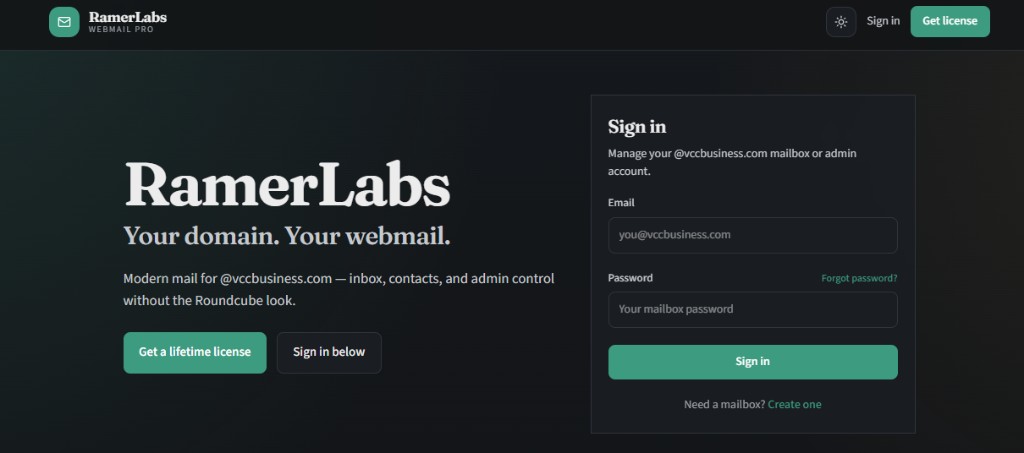
The demo shows the public marketing surface with embedded sign-in. After purchase and license activation on your own deploy, the full inbox, contacts, calendar, and admin console unlock for your mail domain.
Feature walkthrough
Branded landing page and sign-in
Webmail Pro ships with a marketing landing page that puts your product name first, explains the value in one clear line, and includes a sign-in box on the same screen. Visitors do not bounce to a separate login URL unless you want them to.
In Admin you can turn the landing page on or off. When it is off, visitors go straight to the login flow. When it is on, you get a storefront-style first impression that still converts into mailbox access.
Theme defaults to light. Users can switch to dark with a one-click toggle. Both modes keep readable contrast on the cream or charcoal backgrounds so the hero never becomes “invisible text.”
Real mailboxes via cPanel
Signup is not a fake local account. When a user creates a mailbox, Webmail Pro calls cPanel to create a real POP/IMAP account on your mail domain. Captcha protection (Cloudflare Turnstile or reCAPTCHA) is fail-closed so bots cannot mass-create addresses.
Login verifies credentials against IMAP, then stores the session in an encrypted iron-session cookie. Mailbox passwords are not dumped into localStorage.
Modern three-pane inbox
The mail UI covers the day-to-day workflow people expect:
- Folders: Inbox, Sent, Drafts, Trash, Junk, Archive
- Search and unread filters
- Thread-friendly reading
- Compose, reply, forward, and attachments
- SMTP send through the signed-in mailbox
Encoding quirks from older quoted-printable messages are handled so UTF-8 content does not turn into mojibake in the reader.
Productivity apps in the same shell
Email is only part of how teams work. Webmail Pro includes:
- Contacts – name, email, phone, organization, notes
- Calendar – personal events tied to the account
- To-do – priorities, bulk actions, clear completed
- Notes – private list + editor
- Trading Journal – trades with P&L style stats
- Expenses – category tracking with a currency selector
These tools live behind the same navigation shell as Mail, so users stay in one product instead of bouncing between Roundcube and a pile of side apps.
Security that fits business mail
- Recovery email required at signup for password resets
- TOTP two-factor authentication with backup codes
- Installer admin account for first boot (change the default password immediately)
- Optional admin mailbox allowlist for staff who already have IMAP accounts
- Email blocklist and signup gate controls in Admin
Admin install settings and licensing
Most operators do not want to SSH into env files for every domain tweak. Admin – Install settings covers mail domain, cPanel host and token, IMAP/SMTP hosts, captcha keys, Redis, and related options.
License activation happens in Admin – License. Features stay locked until the license is active, so demos and unpaid copies cannot silently run as full production mail.
Optional Lacidaweb ad placement can appear in the message reader if you want a monetization slot without rebuilding the UI.
Licensing and pricing
RamerLabs Webmail Pro is sold with a lifetime license for one production deployment. Purchase on the store, download the package, deploy, and activate with your key.
Product page: https://ramerlabs.com/product/ramerlabs-webmail-pro/
Need help after purchase? Email support@ramerlabs.com.
Getting started
- Open the live demo at webmailpro.ramerlabs.com and review the UI.
- Buy Webmail Pro from the RamerLabs store and download the source package.
- Deploy to Vercel (or any Node host that can run Next.js).
- Point a subdomain such as
webmail.yourdomain.comat the deployment. - Sign in as the installer admin, activate your license key, and open Install settings.
- Enter cPanel, IMAP, SMTP, captcha, and Redis values for your mail domain.
- Create a test mailbox, send and receive mail, then invite your users.
On Vercel, set Upstash Redis URL and token in the host environment so license state, install settings, and app data survive redeploys.
FAQ and common objections
Is this just another Roundcube skin?
No. It is a Next.js application with its own UI, session model, admin console, and productivity modules. It talks to the same IMAP/SMTP backends you already use, but the product experience is yours.
Do I need to move mail servers?
Usually no. If cPanel already hosts mail for your domain and remote IMAP/SMTP is allowed from your app host, you configure hosts and tokens and go live.
Can I hide the marketing landing page?
Yes. Admin can disable the landing page so visitors land on login instead.
What about installer vs real mailbox accounts?
The installer admin is for license and install settings. Real mailbox users sign in with IMAP passwords and get the full mail and apps experience. That separation keeps operations accounts from looking like broken inboxes.
Where do I get support?
Email support@ramerlabs.com. Include your license key and deployment URL when you need help with activation or mail host connectivity.
Who should buy Webmail Pro now
Buy it if you are tired of apologizing for Roundcube, if clients ask for “Gmail-like” webmail on their own domain, or if you want a licensed product you can deploy once and brand as part of your hosting stack.
Start with the demo, then move to your own domain:
- Live demo: https://webmailpro.ramerlabs.com/
- Buy: RamerLabs Webmail Pro
- Support: support@ramerlabs.com
Your domain. Your webmail. Your brand – without the Roundcube look.